Pi/DV4 mini powered by DeWALT 20v tool battery
DeWALT battery and USB adapter...
pictures of a setup DV4mini
The Pi is now powered by 2a wall wart, but I have 12 Vdc adapter to go in a car or battery pack and I also have solar panel to charge up my battery pack that I made up years ago for all my radios to operate off the grid.
Here is the Pi / Dv4mini fully operational with wifi to hotspot on my iPhone
And all of it controlled by my iPad on the same hotspot from my cellphone.
Of course when at home I would not use my iPhone as hotspot by the house wifi or ethernet cable.
DV4 Mini pointed to a DR1x repeater
Does anyone have the fix on this problem below
We have multiple Dr1x's with dv4 mini's pointed to them. we have the box checked and call sign inserted in the gateway box.
The issue is the GPS and call sign info does not get transmitted in DN If we use VW the box then does pop up for a call sign but its blank.
DV4MF2 Software and Windows 10
I want to climb out the walls with this DV4Mini and Windows 10. I took my Windows 7 x64 PC and installed the DV4Mini software according to the manuals and instructions on the various web sites. The original DG1HT software, DL2MF software and DL5KV software all work perfectly, 100% what is expected.
I also have a Windows 10 x64 PC and notebook. I also installed the DV4Mini on them according to the rules. The original DG1HT software and the DL5KV software work perfectly, 100 what is expected. The problem is the damn DL2MF software that keeps on giving me the error inside the attachment.
I even un-installed everything, I mean everything and started over from the beginning, still same stupid error. Google is not very helpfull either. Any working suggestions please in the group or by email will be highly appreciated.
dv4mini with Raspberry PI 3
DV4mini setup
DV4Mini When is the next update coming out? Dropouts and noises DMR
patch_dv_serial Patch Linux dv_serial for use on FCS002
#! /bin/sh ################################################### # # # Patch Linux dv_serial for FCS002 # # INAD # # # ################################################### # Rename dv_serial mv dv_serial dv_serial.old # Replace FCS001 ip address with the address for FCS002 hexdump -ve '1/1 "%.2x"' dv_serial.old | sed "s/3137362e31302e3130352e323138/37352e3135312e34372e31363100/g" | xxd -r -p > dv_serial # make new dv_serial executable chmod +x dv_serial
DVmini DVserial and DV4MF2
Versions, installation and notes regarding DVmini, DVserial and DV4MF2
It is important to know what each one of these three applications do.
DVmini.exe and DV4MF2.exe are two control panels that do pretty much the same thing but have different authors. They both run on Windows or the Pi. When run on the Pi, however, they both run with “Mono” which is a Windows emulator.
DV_serial, on the other hand, is a different application for both Windows and the Pi. The DV_serial for Windows will not work on the Pi and the Pi version will not work with Windows.
DV4mini system
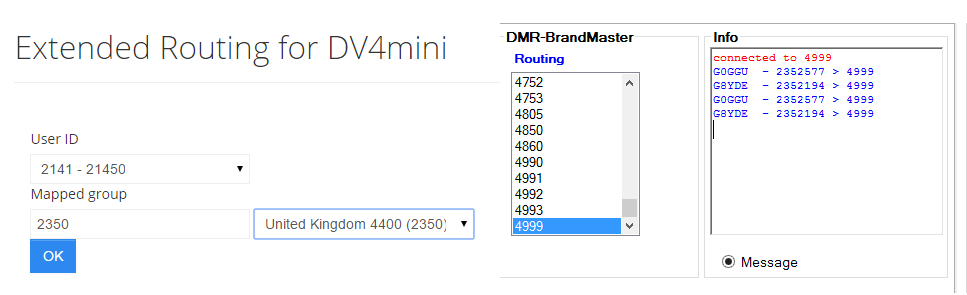
Extended Routing in DV4mini
How to connect?
- DV4mini connect your server to a BrandMeister
- Select and connect to Reflector 4999
- Open a browser and go to the URL BrandMeister Spanish Extended Routing DV4mini
- In the form that appears we will see our UserID "214XYYY"
- TG write we want to plug and play !!!
- You are now mapping the Reflector 4999 TG9 our DV4mini

[DV4mini] dv_serial.exe has stopped working
In order to correct the problem, I find that I have to uninstall the com port (usually com3) in Device Manager and "Scan for Hardware Changes"
I can then reload the DV4mini control panel, and it works once again for an indeterminate period of time.
Problem Event Name: APPCRASH
Application Name: dv_serial.exe
Application Version: 0.0.0.0
Application Timestamp: 5601a45f
Fault Module Name: dv_serial.exe
Fault Module Version: 0.0.0.0
Fault Module Timestamp: 5601a45f
Exception Code: c0000005
Exception Offset: 0000cb3b
OS Version: 6.1.7601.2.1.0.768.11
Locale ID: 4105
Additional Information 1: 0a9e
Additional Information 2: 0a9e372d3b4ad19135b953a78882e789
Additional Information 3: 0a9e
Additional Information 4: 0a9e372d3b4ad19135b953a78882e789
Is anyone else having the dvserial.exe crash on them?
[DV4mini] error oxc000007b
I did a google search on this error code and found some solutions see if any of these help 0xc000007b Error Solution
[DV4mini] Hearing only one side of Conversation
When listening for example to REF001C I often hear only one side of the conversants, sometimes neither of them! And I can check this by switching to my Raspberry PI/ DVAP set up.
If anyone else has encountered this and has a solution I would be delighted to hear from them.
DV4MINI HOTSPOT
A LINK WITH A SIMPLEX FREQUENCY (UHF) AND A REPEATER THROUGH THE INTERNET.
DV4mini Hotspot for the 70 cm band and can use it with a D-STAR or DMR or C4FM * transceivers – The DV4mini is a very small but also very capable USB Stick that can expand any PC into a Hotspot for the D-STAR and DMR modes (C4FM * Fusion is in development) – (trial beta ver. 18.8 or later uncheck “C4FM Gateway” only DN & VW mode) – Please read official data and the User manual! (link below)
DV4mini allows linking with DCS, XRF and REF refectors for D-STAR as well s DMR refectors (trial beta ver. 18.8 or later unckeck C4FM Gateway!). With the DV4mini it has become possible to create a hotspot with minimal resources and thus get access to the (Digital Voice) DV network.[Note] Refector is a server connected to the Internet or Ham Net and is linked to a number of digital Ham Radio repeaters. If one of these repeaters is active it will send the voice data stream to the refector- (Xrefectors are the second generation of D-STAR reflectors… etc) – (DCS (Digital Call Server) is the most modern D-STAR refector system and in worldwide use, each as 26 rooms) – (DMR refectors consist of several regional servers, ach other via a superordinate network one Hytera & one Motorola) (System Fusion supports WIRES-X internet linking – .. node station requires external optional HRI-200 !)
INFORMATION: the reason for dropouts in DMR
Additionally we implemented a couple of diagnostic tools into the DV4mini software which helps to optimize the frequency correction.
From
http://dv4m.ham-dmr.ch/V1.6/
download site
DV4mini Firmware update download
Ken KA6SUB
Try the "save as" option on a right click (Win) to save the image file on the link for download. Craig KV5E
Use a other browser then Windows, like Chrome or Firefox them it works.
I am having the same issue with downloading the 1.64 Firmware. It wants to save as an HTML file. I have used several Browsers. If you could e-mail a copy it would be great. boerep@... regards. Rick
Go to W6KD.boards.net and get the dstar commander image. Burn that to a SD micro card and follow his easy configuration instructions and you will be up and running in about 15 minutes. It is my favorite image and super easy especially if you don't know a lot of Linux.
David
I was wondering if anybody has been successful at updating the firmware on the stick? Each time I download the software for that .FW2 it comes on the computer as an HTML program and cannot be located by the updater. Anyone else having the same problem?
Go to W6KD.boards.net and get the dstar commander image. Burn that to a SD micro card and follow his easy configuration instructions and you will be up and running in about 15 minutes. It is my favorite image and super easy especially if you don't know a lot of Linux.